 |
AliyunPlayer v7.10.0
Aliyun Player API Reference Manual for iOS Platforms
|
|
AliyunPlayer v7.10.0
Aliyun Player API Reference Manual for iOS Platforms
|
#include "AliPlayer.h"
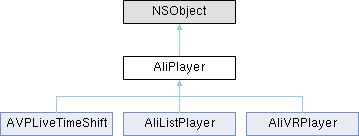
Instance Methods | |
| (void) | - addExtSubtitle: |
| Add external subtitle file. | |
| (void) | - clearScreen |
| Clear screen. | |
| (void) | - clearScreenSync |
| Clear screen sync, suggest using clearScreen. | |
| (void) | - destroy |
| Destroy the player (synchronous). | |
| (void) | - destroyAsync |
| Async delete the player. | |
| (void) | - enableDowngrade:config: |
| Set player downgrade configuration, applicable to RTS custom downgrade url settings, for details please refer to RTS自定义降级url设置. | |
| (NSString *) | - getCacheFilePath: |
| Query the name of the cached file with the specified URL. | |
| (NSString *) | - getCacheFilePath:format:definition: |
| Query the name of the cached file with the specified URL. | |
| (NSString *) | - getCacheFilePath:format:definition:previewTime: |
| Query the name of the cached file with the specified URL. | |
| (AVPConfig *) | - getConfig |
| Query player configuration. | |
| (AVPTrackInfo *) | - getCurrentTrack: |
| Query the track that is being played. | |
| (AVPMediaInfo *) | - getMediaInfo |
| Query media information. | |
| (NSString *) | - getOption: |
| Get player option parameter. | |
| (int64_t) | - getPlayedDuration |
| Get the actual played duration. | |
| (void *) | - getPlayer |
| (NSString *) | - getPlayerName |
| Get used player name. | |
| (NSString *) | - getPropertyString: |
| Get player property information. | |
| (AVPMediaInfo *) | - getSubMediaInfo |
| Query sub-stream media information. | |
| (void) | - getThumbnail: |
| Retrieve the thumbnail image at the specified position. | |
| (NSString *) | - getUserData |
| Get user data of the player instance. | |
| (instancetype) | - init |
| Initialize the player. | |
| (instancetype) | - init: |
| Initialize the player with a trace ID. | |
| (int) | - invokeComponent: |
| Send command to component. | |
| (BOOL) | - isAutoBandWidth |
| Query the status of adaptive initial quality selection for multi-bitrate playback. | |
| (BOOL) | - isEnableSubtitleRender |
| Query whether subtitle rendering is enabled. | |
| (void) | - pause |
| Pause playback. | |
| (void) | - prepare |
| Prepare for playback. | |
| (void) | - redraw |
| Refresh the view in certain situations, for example, when the size of the view changes. | |
| (void) | - reload |
| Reload resources. | |
| (void) | - reset |
| Reset. | |
| (void) | - seekToTime:seekMode: |
| Seek to a specified position. | |
| (void) | - selectExtSubtitle:enable: |
| Select or disable external subtitle track. | |
| (void) | - selectTrack: |
| Switch video quality according to the specified track index. | |
| (void) | - selectTrack:accurate: |
| Switch video quality according to the specified track index with accurate seeking option. | |
| (void) | - sendCustomEvent: |
| Send custom analytics event. | |
| (void) | - setAuthSource: |
| Play by VID and playauth. | |
| (void) | - setAutoBandWidth: |
| Enable or disable adaptive initial playback quality selection for multi-bitrate playback. | |
| (void) | - setBitStreamSource: |
| Play by bit stream. | |
| (BOOL) | - setCacheConfig: |
| Modify cache configuration. | |
| (void) | - setConfig: |
| Modify player configuration. | |
| (void) | - setDefaultBandWidth: |
| Set the default initial playback bitrate for multi-bitrate playback. | |
| (void) | - setDefaultResolution: |
| Set the default initial playback resolution for multi-bitrate playback. | |
| (void) | - setEnableSubtitleRender: |
| Enable or disable subtitle rendering. | |
| (void) | - setEventReportParamsDelegate: |
| Set event report delegate. | |
| (void) | - setFilterConfig: |
| Set filter configuration. | |
| (void) | - setFilterInvalid:invalid: |
| Enable or disable filter. | |
| (void) | - setLiveStsSource: |
| Play by LiveSts. | |
| (void) | - setMaxAccurateSeekDelta: |
| Set the maximum interval for accurate seeking. | |
| (void) | - setMpsSource: |
| Play by VID and MPS. | |
| (void) | - setOnURLSourceExpiredCallback: |
| Set the callback for URL source expiration notification. | |
| (void) | - setOnVidAuthExpiredCallback: |
| Set the callback for VidAuth source expiration notification. | |
| (void) | - setOption:value: |
| Set player specific option (string value). | |
| (void) | - setOption:valueInt: |
| Set player specific option (integer value). | |
| (void) | - setPictureinPictureDelegate: |
| Set delegate for picture-in-picture functionality. | |
| (void) | - setPictureInPictureEnable: |
| Enable or disable picture-in-picture functionality. | |
| (void) | - setPictureInPictureShowMode: |
| Set display mode for picture-in-picture functionality. | |
| (void) | - setPlayerScene: |
| Set player scene. | |
| (void) | - setPlayUrlConvertCallback: |
| Set a URL conversion callback. | |
| (void) | - setPreferPlayerName: |
| Set preferred player kernel. | |
| (void) | - setStartTime:seekMode: |
| Set the initial playback position. | |
| (void) | - setStreamDelayTime:time: |
| set the delay time of the stream, default is 0 only support external subtitles | |
| (void) | - setStsSource: |
| Play by VID and STS. | |
| (void) | - setThumbnailUrl: |
| Specify a thumbnail image URL. | |
| (void) | - setTraceID: |
| Set a trace ID for debugging. | |
| (void) | - setUrlSource: |
| Play by URL. | |
| (void) | - setUserData: |
| Set user data for the player instance. | |
| (void) | - setVerifyStsCallback: |
| Set STS validity verification callback for encrypted live streaming. | |
| (void) | - setVideoTag:size: |
| Set the video tags. | |
| (void) | - snapShot |
| Capture the current frame. | |
| (void) | - start |
| Start playing. | |
| (void) | - stop |
| Stop playback. | |
| (void) | - switchStream: |
| Multi definition stream switch by url. | |
| (void) | - updateFilterConfig:options: |
| Update filter configuration. | |
| (void) | - updateLiveStsInfo:accKey:token:region: |
| Update LiveStsInfo. | |
Class Methods | |
| (NSString *) | + getDeviceUUID |
| Query device UUID. | |
| (NSString *) | + getSDKVersion |
| Query the SDK version. | |
| (void) | + initPlayerComponent:function: |
| Initialize player component. | |
| (BOOL) | + isFeatureSupport: |
| Query feature support. | |
| (void) | + netWorkReConnect |
| reconnect all connections, call this when netWork router changed, and the player will use new router. | |
| (void) | + setAudioSessionDelegate: |
| Set AudioSession delegate. | |
| (void) | + setEnableLog: |
| Enable or disable logging. | |
| (void) | + setLogCallbackInfo:callbackBlock: |
| Set a log output callback block. | |
| (void) | + setLogOption:value: |
| Set log option. | |
Properties | |
| id< CicadaRenderDelegate > renderDelegate | __deprecated |
| Set the render callback. | |
| AVPAlphaRenderMode | alphaRenderMode |
| Set alpha render mode, can be used on gift play on live stream, etc. | |
| BOOL | autoPlay |
| Enable or disable autoplay. | |
| int64_t | bufferedPosition |
| Buffered position. | |
| int64_t | currentDownloadSpeed |
| Current network download speed. | |
| int64_t | currentPosition |
| Current playback position. | |
| int64_t | currentUtcTime |
| Query the current playback utc time. | |
| id< AVPDelegate > | delegate |
| Player delegate. | |
| id< AVPDrmDelegate > | drmDelegate |
| DRM delegate. | |
| int64_t | duration |
| Playback duration. | |
| BOOL | enableHardwareDecoder |
| Hardware decoding enabled state. | |
| id< AVPEventReportParamsDelegate > | eventReportParamsDelegate |
| Set the event report callback. | |
| int | height |
| Query the height of the video. | |
| int64_t | localCacheLoadedSize |
| Local cache hit size. | |
| BOOL | loop |
| Enable or disable loop playback. | |
| AVPMirrorMode | mirrorMode |
| Set a mirroring mode. | |
| BOOL | muted |
| Mute or unmute the player. | |
| AVPOutputAudioChannel | outputAudioChannel |
| Set the output audio channel, if input source is stereo, support select to left or right channel and if intput source is mono, this api can't take effect. | |
| AVPStatus | playerStatus |
| Player status. | |
| AVPView * | playerView |
| Set a player view (playerView). | |
| float | rate |
| Set the playback speed. | |
| id< CicadaRenderingDelegate > | renderingDelegate |
| Video rendering delegate (new). | |
| AVPRotateMode | rotateMode |
| Set a rotate mode. | |
| int | rotation |
| Query the rotate angle of the video, which is retrieved from the video metadata. | |
| AVPScalingMode | scalingMode |
| Set a zoom mode. | |
| float | volume |
| Query or set the volume of the player(Not system volume). | |
| int | width |
| Query the width of the video. | |
| - (void) addExtSubtitle: | (NSString *) | URL |
Add external subtitle file.
Adds an external subtitle file for the player to use. Supports various subtitle formats including SRT, ASS, VTT, etc. After adding, you can select and display it via selectExtSubtitle. For external subtitle usage, refer to External Subtitles
| URL | Subtitle file URL address supporting local file path (file://) or network address (http://, https://) |
| - (void) clearScreen |
Clear screen.
| - (void) clearScreenSync |
Clear screen sync, suggest using clearScreen.
| - (void) destroy |
Destroy the player (synchronous).
Synchronously releases all resources occupied by the player. After calling this method, the player instance is no longer usable. Recommended to call when playback is no longer needed.
Implemented in AliListPlayer.
| - (void) destroyAsync |
Async delete the player.
When instance is not needed, skip calling stop api and call this destroyAsync api can speed up view response. Once called, don't call prepare to start new play.
Implemented in AliListPlayer.
| - (void) enableDowngrade: | (AVPUrlSource *) | source | |
| config: | (AVPConfig *) | config |
Set player downgrade configuration, applicable to RTS custom downgrade url settings, for details please refer to RTS自定义降级url设置.
| source | downgrade url |
| config | downgrade config. |
| - (NSString *) getCacheFilePath: | (NSString *) | URL |
Query the name of the cached file with the specified URL.
If a custom rule is set, delegate onGetCacheNameByURL.
If the delegation failed, the default logic is used to generate the file name.
| URL | The URL of the cached file. |
| - (NSString *) getCacheFilePath: | (NSString *) | vid | |
| format: | (NSString *) | format | |
| definition: | (NSString *) | definition |
Query the name of the cached file with the specified URL.
If a custom rule is set, delegate onCacheNameByVidCallback.
If the delegation failed, the default logic is used to generate the file name.
| vid | The VID of the video. |
| format | The format of the video. |
| definition | The definition of the video. |
| - (NSString *) getCacheFilePath: | (NSString *) | vid | |
| format: | (NSString *) | format | |
| definition: | (NSString *) | definition | |
| previewTime: | (int) | previewTime |
Query the name of the cached file with the specified URL.
If a custom rule is set, delegate onCacheNameByVidCallback.
If the delegation failed, the default logic is used to generate the file name.
| vid | The VID of the video. |
| format | The format of the video. |
| definition | The definition of the video. |
| previewTime | The preview duration of the video. |
| - (AVPConfig *) getConfig |
| - (AVPTrackInfo *) getCurrentTrack: | (AVPTrackType) | type |
| + (NSString *) getDeviceUUID |
Query device UUID.
Gets the unique identifier of the current device. Can be used for device tracking and log analysis.
| - (AVPMediaInfo *) getMediaInfo |
Query media information.
Retrieves detailed information about the current playback media, including all track information for video, audio, subtitles, etc. This method should only be called after receiving AVPEventType::AVPEventPrepareDone event.
| - (NSString *) getOption: | (AVPOption) | key |
Get player option parameter.
Queries real-time performance metrics of the player, such as current rendering frame rate, network bitrate, video bitrate, etc.
| key | Option key specifying the type of parameter to query |
| - (int64_t) getPlayedDuration |
Get the actual played duration.
Retrieves the actual playback duration, not affected by seek operations. This duration does not include non-playback time such as pauses and buffering.
Use setOption:valueInt: with PLAYED_DURATION_INCLUDE_SPEED option to control whether playback duration considers playback speed effects.
| - (void *) getPlayer |
| - (NSString *) getPlayerName |
Get used player name.
| - (NSString *) getPropertyString: | (AVPPropertyKey) | key |
Get player property information.
Retrieves player property information based on the specified property key, such as HTTP response information, connection information, etc. These properties are typically used for debugging, performance analysis, and diagnostics.
| key | Property key specifying the type of property to query |
| + (NSString *) getSDKVersion |
Query the SDK version.
| - (AVPMediaInfo *) getSubMediaInfo |
Query sub-stream media information.
Retrieves media information of sub-streams (sub-m3u8) in multi-bitrate HLS streams.
| - (void) getThumbnail: | (int64_t) | positionMs |
Retrieve the thumbnail image at the specified position.
Asynchronously retrieves the thumbnail image at the specified playback position. The result is returned via AVPDelegate::onGetThumbnailSuc and AVPDelegate::onGetThumbnailFailed callbacks.
setThumbnailUrl must be called before invoking this method.
| positionMs | Specified position in milliseconds |
| - (NSString *) getUserData |
Get user data of the player instance.
Retrieves user data previously set via setUserData. Each player instance can bind one user data.
| - (instancetype) init |
Initialize the player.
Creates a player instance. The player must be initialized through this method before any subsequent playback operations.
Implemented in AliListPlayer, and AliVRPlayer.
| - (instancetype) init: | (NSString *) | traceID |
Initialize the player with a trace ID.
| traceID | A trace ID for debugging. Set as "DisableAnalytics" to disable report analytics data to server(not recommended). We recommend using the Player Single Point Trace function to trace the playback behavior of a specific user or playback session. The traceId value is defined by you, which must be a unique identifier for your user or device. For example, you can pass in your user's userid or IMEI, IDFA, etc. |
Implemented in AliListPlayer, and AliVRPlayer.
| + (void) initPlayerComponent: | (NSString *) | functionName | |
| function: | (void *) | function |
Initialize player component.
Initializes optional player components. These components are optional; you can remove dynamic libraries and initialization code to trim unused functionality.
| functionName | Component feature name |
| function | Component initialization function pointer |
| - (int) invokeComponent: | (NSString *) | content |
| - (BOOL) isAutoBandWidth |
Query the status of adaptive initial quality selection for multi-bitrate playback.
| - (BOOL) isEnableSubtitleRender |
Query whether subtitle rendering is enabled.
| + (BOOL) isFeatureSupport: | (SupportFeatureType) | type |
Query feature support.
Checks whether the current device supports the specified feature, such as Dolby Audio.
| type | Feature type |
| + (void) netWorkReConnect |
reconnect all connections, call this when netWork router changed, and the player will use new router.
| - (void) pause |
Pause playback.
Pauses the current playback. Status changes are notified via AVPDelegate::onPlayerStatusChanged. If the player is already paused or stopped, this call has no effect. To resume playback, call start.
| - (void) prepare |
Prepare for playback.
Asynchronous callback. Initializes media resources, establishes network connections, and loads media information. Completion is notified via AVPEventType::AVPEventPrepareDone event or AVPDelegate::onPlayerStatusChanged callback. The time to prepare to prepare complete is related to AVPConfig::startBufferDuration.
| - (void) redraw |
Refresh the view in certain situations, for example, when the size of the view changes.
| - (void) reload |
Reload resources.
You can reload resources when the network connection times out.
| - (void) reset |
Reset.
| - (void) seekToTime: | (int64_t) | time | |
| seekMode: | (AVPSeekMode) | seekMode |
Seek to a specified position.
| time | The specified position that the player will seek to, Unit: millisecond. |
| seekMode | Seek mode. |
| - (void) selectExtSubtitle: | (int) | trackIndex | |
| enable: | (BOOL) | enable |
Select or disable external subtitle track.
Selects a specific external subtitle track for display, or disables subtitle display. Track index is obtained via AVPMediaInfo.
| trackIndex | Subtitle track index obtained via getMediaInfo for available subtitle tracks |
| enable | YES to select and display the subtitle track, NO to disable subtitle display |
| - (void) selectTrack: | (int) | trackIndex |
Switch video quality according to the specified track index.
Supports manual quality selection or adaptive bitrate mode.
| trackIndex | Target quality track index. Use SELECT_AVPTRACK_TYPE_VIDEO_AUTO for adaptive bitrate adjustment |
| - (void) selectTrack: | (int) | trackIndex | |
| accurate: | (BOOL) | accurate |
Switch video quality according to the specified track index with accurate seeking option.
| trackIndex | Target quality track index. Use SELECT_AVPTRACK_TYPE_VIDEO_AUTO for adaptive bitrate adjustment |
| accurate | Whether to use accurate seeking mode for switching. YES for accurate seeking, NO for fast seeking |
| - (void) sendCustomEvent: | (NSString *) | args |
Send custom analytics event.
Sends a custom event to the player's analytics system, which will be passed to the application via AVPEventReportParamsDelegate callback. Used to unify business events through the player's analytics callback for centralized data collection and processing.
Custom event code is 5001; args parameter contains custom event data passed through transparently.
| args | Custom event parameter data; can be any string |
| + (void) setAudioSessionDelegate: | (id< CicadaAudioSessionDelegate >) | delegate |
Set AudioSession delegate.
Sets a custom delegate for iOS AVAudioSession to handle audio session events and configuration.
| delegate | AudioSession delegate object |
| - (void) setAuthSource: | (AVPVidAuthSource *) | source |
Play by VID and playauth.
See https://help.aliyun.com/document_detail/57294.html Plays video after authentication through Alibaba Cloud Video ID and playback authorization token. This is the recommended authentication method by Alibaba Cloud for most scenarios.
| source | AVPVidAuthSource type. |
| - (void) setAutoBandWidth: | (BOOL) | enable |
Enable or disable adaptive initial playback quality selection for multi-bitrate playback.
Enables or disables automatic initial resolution selection in adaptive bitrate (ABR) mode. When enabled, the player automatically selects an appropriate resolution based on network conditions without manual specification.
| enable | YES to enable adaptive initial quality selection, NO to disable (use default quality) |
| - (void) setBitStreamSource: | (AVPBitStreamSource *) | source |
| - (BOOL) setCacheConfig: | (AVPCacheConfig *) | cacheConfig |
Modify cache configuration.
| AVPCacheConfig | Cache configuration. AVPCacheConfig. |
| - (void) setConfig: | (AVPConfig *) | config |
Modify player configuration.
Modifies various player configuration parameters such as buffer duration, autoplay, loop playback, etc. Recommended to configure before calling prepare.
| config | AVPConfig instance containing all configurable player parameters |
| - (void) setDefaultBandWidth: | (int) | bandWidth |
Set the default initial playback bitrate for multi-bitrate playback.
For multi-bitrate stream playback, the player selects the stream closest to the specified bitrate. If adaptive bitrate mode is enabled, this setting may be ignored.
| bandWidth | Default initial playback bitrate in bps (bits per second) |
| - (void) setDefaultResolution: | (int) | resolutionProduct |
Set the default initial playback resolution for multi-bitrate playback.
Specifies the default initial resolution through the product of resolution width and height. The player selects the resolution closest to this value. For example, 1920×1080 resolution has a product of 2,073,600.
| resolutionProduct | Product of target resolution width and height. Player selects closest resolution |
| + (void) setEnableLog: | (BOOL) | enableLog |
Enable or disable logging.
Globally controls whether the player outputs debug logs. When enabled, log information can be obtained via callbacks or system logs.
| enableLog | YES to enable logging, NO to disable logging |
| - (void) setEnableSubtitleRender: | (BOOL) | enable |
Enable or disable subtitle rendering.
| enable | true: enable, false: disable |
| - (void) setEventReportParamsDelegate: | (id< AVPEventReportParamsDelegate >) | delegate |
Set event report delegate.
Sets the delegate object for event reporting parameters to receive player analytics data. This allows unified business event tracking through the player's callback.
| delegate | Event report parameter delegate object |
| - (void) setFilterConfig: | (AVPFilterConfig *) | filterConfig |
Set filter configuration.
Configures video filter effects for the player. Filter configuration should be set before calling prepare. To dynamically update filters, use updateFilterConfig. Filters are effective only when enabled; they can be temporarily disabled via setFilterInvalid.
| filterConfig | Filter configuration object |
| - (void) setFilterInvalid: | (NSString *) | target | |
| invalid: | (BOOL) | invalid |
Enable or disable filter.
Controls the enable/disable state of a specified filter. After disabling, parameters are retained and the previous configuration is restored when re-enabled.
| target | Filter target name. If empty string or nil, the operation affects all configured filters |
| invalid | YES to disable the filter (invalid state), NO to enable the filter (valid state) |
| - (void) setLiveStsSource: | (AVPLiveStsSource *) | source |
Play by LiveSts.
Plays encrypted live stream after authentication through temporary security token. Suitable for live streaming scenarios requiring access control and encryption.
| source | AVPLiveStsSource type. |
| + (void) setLogCallbackInfo: | (AVPLogLevel) | logLevel | |
| callbackBlock: | (void(^)(AVPLogLevel logLevel, NSString *strLog)) | block |
Set a log output callback block.
Asynchronous.
| logLevel | The level of the log. |
| callbackBlock | Log output callback block, which can be nil. |
| + (void) setLogOption: | (AVPLogOption) | logOption | |
| value: | (int) | value |
Set log option.
Configures specific features of the logging system, such as enabling frame-level logging.
| logOption | Log option type |
| value | Option value. 0 to disable, 1 to enable |
| - (void) setMaxAccurateSeekDelta: | (int) | delta |
Set the maximum interval for accurate seeking.
When the distance between the accurate seek position and the previous keyframe exceeds this interval, the player no longer supports accurate seeking and switches to fast seek mode. This avoids long processing times for seeking far distances.
| delta | Interval duration in milliseconds. Accurate seeks exceeding this distance will degrade to fast seek. |
| - (void) setMpsSource: | (AVPVidMpsSource *) | source |
Play by VID and MPS.
| source | AVPVidMpsSource type. |
setAuthSource instead. | - (void) setOnURLSourceExpiredCallback: | (void(^)(id expiredSource, id< AVPSourceRefreshCallback > callback)) | callback |
Set the callback for URL source expiration notification.
This method is triggered when the player detects that the current URL source has expired. You can refresh the URL source within the callback and use the callback to return the updated URL source, ensuring uninterrupted video playback.
| callback | The callback block triggered when the URL source expires. Use this callback to provide a valid URLSource object to update the player. |
| - (void) setOnVidAuthExpiredCallback: | (void(^)(id expiredSource, id< AVPSourceRefreshCallback > callback)) | callback |
Set the callback for VidAuth source expiration notification.
This method is triggered when the player detects that the current VidAuth source has expired. You can refresh the VidAuth source within the callback and use the callback to return the updated VidAuth source, ensuring uninterrupted and smooth video playback.
| callback | The callback block triggered when the VidAuth source expires. Use this callback to provide a valid VidAuth object to update the player. |
| - (void) setOption: | (PlayerOption) | key | |
| value: | (NSString *) | value |
Set player specific option (string value).
Sets option parameters for specific player features. Some options accept string-type values.
| key | Option key specifying the type of option to set |
| value | String representation of the option value |
| - (void) setOption: | (PlayerOption) | key | |
| valueInt: | (int) | value |
Set player specific option (integer value).
Sets option parameters for specific player features. Some options accept integer-type values.
| key | Option key specifying the type of option to set |
| value | Integer representation of the option value |
Implemented in AliListPlayer.
| - (void) setPictureinPictureDelegate: | (id< AliPlayerPictureInPictureDelegate >) | delegate |
Set delegate for picture-in-picture functionality.
Sets the delegate object for Picture-in-Picture (PIP) functionality to handle PIP-related events and state changes.
| delegate | Delegate object for picture-in-picture functionality |
| - (void) setPictureInPictureEnable: | (BOOL) | enable |
Enable or disable picture-in-picture functionality.
Globally controls whether iOS system picture-in-picture functionality is enabled. This feature requires iOS 15 or later. For systems below iOS 15, you can implement custom picture-in-picture by obtaining pixel buffer data via CicadaRenderingDelegate.
| enable | YES to enable picture-in-picture, NO to disable |
| - (void) setPictureInPictureShowMode: | (AVPPIPShowMode) | pipShowMode |
Set display mode for picture-in-picture functionality.
Specifies how control UI is displayed in picture-in-picture mode. Can choose to show all buttons or hide specific ones.
| pipShowMode | Picture-in-picture display mode. Default is AVP_SHOW_MODE_DEFAULT |
| - (void) setPlayerScene: | (AVPScene) | scene |
Set player scene.
Specifies a playback scenario (long video, short video, live streaming, etc.) for the player. The player automatically applies optimal configurations for the scenario without manual parameter adjustment.
| scene | Player scene type |
| - (void) setPlayUrlConvertCallback: | (PlayURLConverCallback) | callback |
Set a URL conversion callback.
URL conversion is typically used in P2P broadcasting.
| callback | The function pointer of the callback. |
| - (void) setPreferPlayerName: | (NSString *) | name |
Set preferred player kernel.
Specifies the player kernel type, can choose between self-developed kernel or system kernel. This setting must be made before calling prepare to take effect.
| name | Player kernel name. Default is empty string (use self-developed kernel). "AppleAVPlayer" to use iOS system player |
| - (void) setStartTime: | (int64_t) | time | |
| seekMode: | (AVPSeekMode) | seekMode |
Set the initial playback position.
Specifies the position where playback begins. This method is only effective when called before prepare, and takes effect only once per preparation. Replaces the traditional pre-playback seek approach.
| time | Initial playback position in milliseconds |
| seekMode | Seek mode specifying accurate or fast positioning |
| - (void) setStreamDelayTime: | (int) | index | |
| time: | (int) | time |
set the delay time of the stream, default is 0 only support external subtitles
| index | steam index |
| time | ms |
| - (void) setStsSource: | (AVPVidStsSource *) | source |
Play by VID and STS.
For STS, see https://help.aliyun.com/document_detail/28756.html Plays video after authentication and authorization through Alibaba Cloud Video ID and temporary security token. Suitable for scenarios requiring access control.
| source | AVPVidStsSource type. |
| - (void) setThumbnailUrl: | (NSString *) | URL |
Specify a thumbnail image URL.
Sets the URL address of the thumbnail image. Must be called before getThumbnail. Thumbnails can be generated through Alibaba Cloud console configuration.
| URL | URL address of the thumbnail service |
| - (void) setTraceID: | (NSString *) | traceID |
Set a trace ID for debugging.
Sets a unique identifier for log tracing and diagnostics for the player instance. Recommended to use Player Single Point Trace for diagnostics and performance analysis. The traceID should be a unique identifier for user or device, such as userid, IMEI, or IDFA.
| traceID | Unique identifier for log tracing |
| - (void) setUrlSource: | (AVPUrlSource *) | source |
Play by URL.
Sets the playback source as a URL address. Supports live and VOD streams with HTTP, HTTPS protocols.
| source | AVPUrlSource type. |
| - (void) setUserData: | (NSString *) | userData |
Set user data for the player instance.
Binds custom user data to this player instance. In multi-instance scenarios, can be used to differentiate different player instances. User data can be retrieved via getUserData.
| userData | Custom user data string; can be any business-related data such as user ID, video ID, etc. |
| - (void) setVerifyStsCallback: | (AVPStsStatus(^)(AVPStsInfo info)) | callback |
Set STS validity verification callback for encrypted live streaming.
During encrypted live streaming playback, when encryption key needs to be updated, the player verifies whether the current STS credentials are valid through this callback. Developers must listen to this callback and return the STS status. If STS is invalid, update with latest credentials via updateLiveStsInfo.
| callback | STS validity check callback. Callback parameter is current STS information, return value is STS status |
| - (void) setVideoTag: | (int *) | tags | |
| size: | (int) | size |
| - (void) snapShot |
Capture the current frame.
Asynchronously captures the image of the current playback frame. The screenshot result is returned via AVPDelegate::onCaptureScreen callback.
| - (void) start |
Start playing.
You must call prepare before calling this method. Status changes are notified via AVPDelegate::onPlayerStatusChanged. If the player is already playing, this call has no effect.
Implemented in AVPLiveTimeShift.
| - (void) stop |
Stop playback.
Stops the current playback. Status changes are notified via AVPDelegate::onPlayerStatusChanged. After stopping, player resources are not automatically released. Call destroy or destroyAsync.
Implemented in AliListPlayer, and AVPLiveTimeShift.
| - (void) switchStream: | (NSString *) | URL |
Multi definition stream switch by url.
You can get result from AVPDelegate onStreamSwitchedSuccess/onStreamSwitchedFail.
| url | new url address Note:
|
| - (void) updateFilterConfig: | (NSString *) | target | |
| options: | (AVPFilterOptions *) | options |
Update filter configuration.
Dynamically updates parameters of configured filters. This method can be called during playback without re-preparing.
| target | Filter target specifying the name of the filter to update |
| options | Filter option parameters containing new filter configuration values |
| - (void) updateLiveStsInfo: | (NSString *) | accId | |
| accKey: | (NSString *) | accKey | |
| token: | (NSString *) | token | |
| region: | (NSString *) | region |
Update LiveStsInfo.
| accId | the AccessKey ID for authentication. |
| accKey | the AccessKey Secret for authentication. |
| token | securityToken The specified token. |
| region | The specified regions. |
|
readwritenonatomicweak |
|
readwritenonatomicassign |
Set alpha render mode, can be used on gift play on live stream, etc.
Detail usage: doc
|
readwritenonatomicassign |
Enable or disable autoplay.
When enabled, playback starts automatically after preparation completes. KVO is supported.
|
readnonatomicassign |
Buffered position.
Read-only property querying the currently buffered playback position in milliseconds. Supports KVO observing. Used for displaying buffer progress bar; always greater than or equal to current position.
|
readnonatomicassign |
Current network download speed.
Read-only property querying current download speed in bits per second (bps). Supports KVO observing. Speed updates in real-time during playback for network speed display.
|
readnonatomicassign |
Current playback position.
Read-only property querying the current playback position in milliseconds. Supports KVO observing. Position updates in real-time during playback, can be also collected by AVPDelegate::onCurrentPositionUpdate callback.
|
readnonatomicassign |
Query the current playback utc time.
KVO is supported.
|
readwritenonatomicweak |
Player delegate.
Sets or queries the player's delegate object. Delegate receives various event callbacks from the player such as preparation completion, errors, track information, etc. Uses weak reference to avoid circular references.
|
readwritenonatomicweak |
DRM delegate.
Sets or queries the delegate for DRM (Digital Rights Management) related requests. This delegate is only triggered when playing via URL; VidAuth and VidSts methods do not trigger it. Currently supports Fairplay DRM only. Uses weak reference to avoid circular references.
|
readnonatomicassign |
Playback duration.
Read-only property querying the total duration of the current media in milliseconds. Supports KVO observing. Valid only after media information is loaded.
|
readwritenonatomicassign |
Hardware decoding enabled state.
Enables or disables hardware video decoding. Hardware decoding improves decoding efficiency but may not support certain codec formats. If hardware decoding fails, the player automatically falls back to software decoding. With adaptive fallback callback configured (AliPlayerGlobalSettings::setAdaptiveDecoderGetBackupURLCallback), can further degrade to different codec streams (e.g., H.265 to H.264).
|
readwritenonatomicweak |
Set the event report callback.
|
readnonatomicassign |
Query the height of the video.
KVO is supported.
|
readnonatomicassign |
Local cache hit size.
Read-only property querying the size of local cached file used at playback start in bytes. Value greater than 0 indicates cache hit and playback uses cached file. Supports KVO observing.
|
readwritenonatomicassign |
Enable or disable loop playback.
KVO is supported.
|
readwritenonatomicassign |
|
readwritenonatomicassign |
Mute or unmute the player.
KVO is supported.
|
readwritenonatomicassign |
Set the output audio channel, if input source is stereo, support select to left or right channel and if intput source is mono, this api can't take effect.
This api can take effect on both audio render and audio pcm data callback.
|
readnonatomicassign |
Player status.
Read-only property querying the current player status. Supports KVO observing. Status changes are notified via AVPDelegate::onPlayerStatusChanged.
|
readwritenonatomicstrong |
Set a player view (playerView).
AVPView: Mac platform: NSOpenGLView. iOS platform: UIView.
|
readwritenonatomicassign |
Set the playback speed.
Value 1 indicates normal speed. KVO is supported.
|
readwritenonatomicweak |
Video rendering delegate (new).
Sets or queries the delegate for video rendering events. Uses weak reference to avoid circular references.
|
readwritenonatomicassign |
|
readnonatomicassign |
Query the rotate angle of the video, which is retrieved from the video metadata.
KVO is supported.
|
readwritenonatomicassign |
|
readwritenonatomicassign |
Query or set the volume of the player(Not system volume).
KVO is supported. The range is 0.0~2.0,it maybe lead to noise if set volume more then 1.0, not recommended.
|
readnonatomicassign |
Query the width of the video.
KVO is supported.
 1.15.0